

Introduction
Are you a developer or a product owner struggling with the time-consuming and error-prone task of creating professional invoices? Look no further! In this comprehensive guide, we'll delve into the essential requirements of invoices, share expert design tips, and provide you with valuable insights to simplify the invoicing process.
We understand the challenges you face when it comes to generating accurate and visually appealing invoices. That's why we've created an invoice generator and template editor designed to streamline the invoicing process and save you valuable time.
However, the purpose of this article is not just to promote our solution, but to equip you with the knowledge and tools necessary to create professional invoices regardless of the method you choose. We will provide you with invaluable insights on invoice requirements, discuss design principles that leave a lasting impression, and even offer free templates to jumpstart your invoicing journey.
So, whether you decide to utilize our invoice generator and template editor or explore other methods, this guide is tailored to help you create outstanding invoices that reflect your professionalism and ensure timely payments.
Join us as we dive into the world of invoicing, discover best practices, and gain practical tips to enhance your invoicing process. Let's begin our journey toward efficient and effective invoice creation!
Understanding the Key Elements of an Invoice
When it comes to creating invoices, including specific information is crucial for smooth business transactions. An invoice serves as a formal request for payment, providing a clear record of the goods or services delivered to the client. Let's explore the key elements that should be included in an invoice:
1. Invoice Number: Assigning a unique identification number to each invoice is vital. It helps you maintain accurate financial records and ensures compliance with accounting standards. Consistent and sequential invoice numbers make it easier for your accountant and the IRS to track and reference invoices, reducing the chances of errors or discrepancies in your books.
2. Contact Information: Be sure to include your business name, address, phone number, and email address, along with the client's contact information. This ensures that both parties have the necessary details for any inquiries related to the invoice, facilitating effective communication.
3. Date: Clearly indicating the date of invoice issuance allows for easy reference and establishes the payment timeline. This helps you and your clients stay informed about payment due dates, enabling timely payments.
4. Billing Items: Provide a comprehensive breakdown of the goods or services provided, including descriptions, quantities, rates, and total amounts for each item. This transparent breakdown minimizes confusion and disputes regarding the charges, ensuring a smooth payment process.
5. Payment Terms: Clearly state the agreed-upon payment terms, including the due date, accepted payment methods, and any applicable late payment penalties or early payment discounts. This ensures clarity and alignment between you and your clients regarding payment expectations, fostering a strong working relationship.
Accurate invoice numbers lay a solid foundation for effective bookkeeping and financial management. They help maintain a clear audit trail, reconcile payments, and resolve any disputes or inquiries that may arise. By adopting a disciplined approach to assigning invoice numbers, you demonstrate professionalism and reliability in your financial practices.
Design and Layout Tips for Professional Invoices
Creating a visually appealing invoice design is crucial as it contributes to making a positive impression on clients. A well-designed invoice not only enhances professionalism but also improves the overall user experience. It's especially important for small businesses to establish credibility through their invoices.
When you're a small business, every touchpoint with your clients matters. Your invoice is an opportunity to showcase your brand's credibility and attention to detail. A professionally designed invoice sends a message that you take your business seriously and value the relationship with your clients. It instills confidence and trust, making clients more likely to view you as a reliable partner.
Branding elements play a significant role in creating a credible and professional invoice. By incorporating your company's logo, tagline, and brand colors, you reinforce brand identity and establish a consistent visual presence across all communication materials. This consistency builds brand recognition and strengthens the perception of your business.
Designing professional invoices becomes effortless with our template editor. It offers a range of customizable designs, allowing you to create personalized and professional invoices that reflect your brand image. With intuitive editing features, you can easily add your logo, customize colors, and arrange the layout to suit your preferences.
It's worth noting that big players like Google may prioritize functionality over aesthetics in their invoice designs. While they can afford to send plain HTML invoices, smaller businesses benefit from investing in visually appealing designs that reinforce their brand and create a positive impression.
Remember, a well-designed invoice not only enhances the visual appeal but also improves the chances of timely payments and fosters a positive relationship with your clients. Don't underestimate the impact that a credible and professionally designed invoice can have on your business.
Let's look at a practical example:
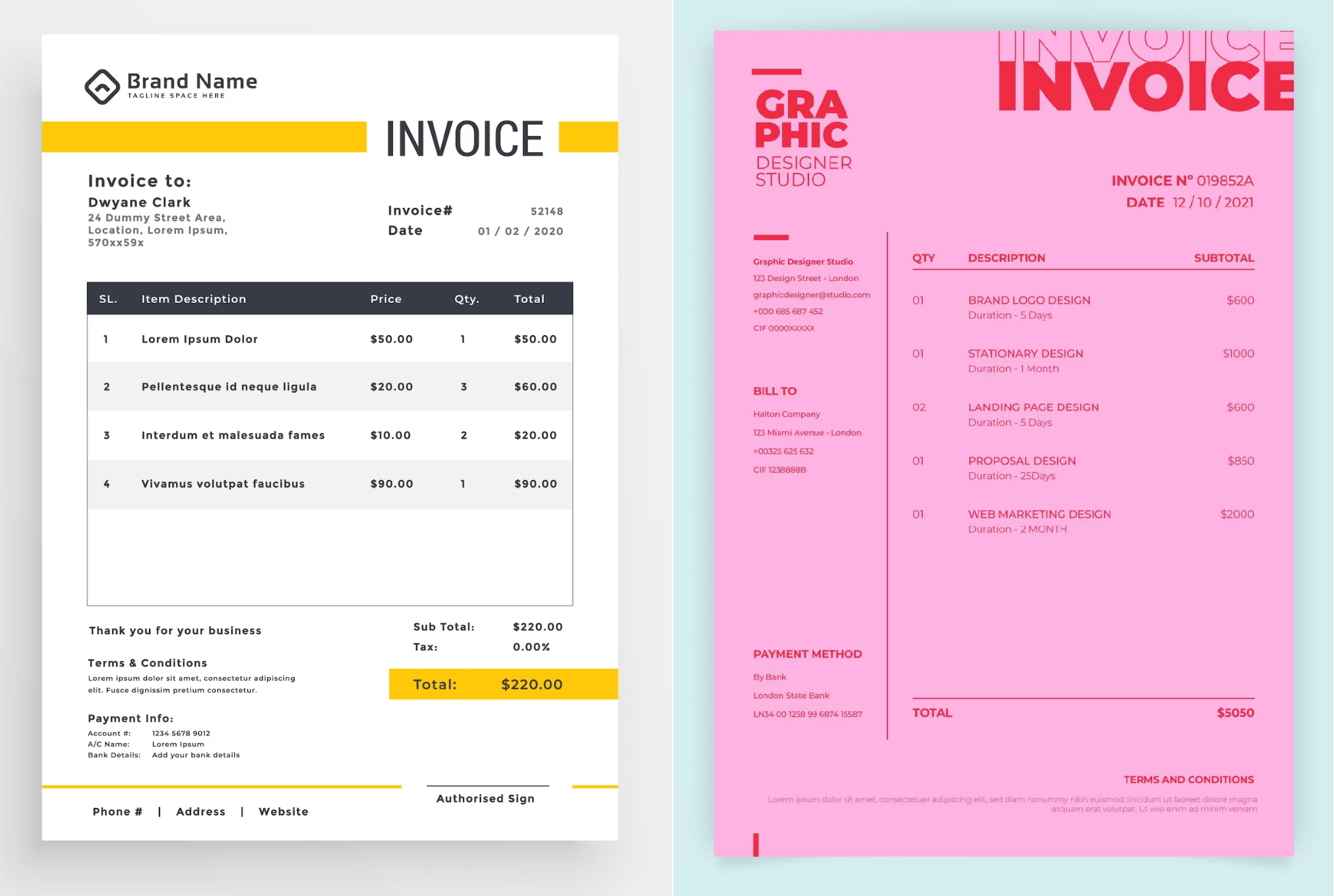
As shown in the image above, the left invoice template serves as an excellent example of a well-designed invoice. It exhibits a clear and crisp layout that immediately identifies it as an invoice or a quote. The template showcases a thoughtfully selected font, ensuring legibility and readability of the text. The font choice reflects professionalism and aligns with the overall brand image.
In addition, the left invoice template incorporates a well-structured and organized table that allows for easy navigation and comprehension of the billing items and associated details. The table's clear and concise format contributes to a seamless reading experience, reducing the chances of confusion or errors when reviewing the invoice.
Furthermore, the color choices in the left invoice template are strategically selected to enhance readability and visual appeal. The appropriate contrast between the text and background ensures that the information is easily legible and accessible to the recipient. By using colors strategically, such as highlighting important sections or total amounts, the invoice becomes more visually engaging and professional.
It is worth noting that the left invoice template effectively incorporates the company's branding elements, such as the logo, tagline, and consistent use of brand colors. These elements reinforce brand identity and create a cohesive visual presence across all communication materials, promoting brand recognition and professionalism. Even though this is a template, using a mocking of a logo, it feels like there is a real company out there called 'Brand Name'.
In contrast, the right invoice template in the image above demonstrates several design flaws. The excessive use of a single color throughout the document diminishes readability, as there is insufficient contrast between the text and background. The table's unclear structure and formatting make it challenging to discern the information presented, potentially leading to confusion and errors during invoice processing. Additionally, the stylized text effect used for the word "INVOICE" may hinder readability and comprehension.
By reflecting on these examples, it becomes evident that a well-designed invoice should prioritize clear and legible typography, appropriate color choices, and an organized layout. Such design considerations contribute to improved readability, ease of understanding, and a professional appearance, ultimately enhancing the overall invoicing experience for both the business and its clients.
Remember, a well-designed invoice not only enhances visual appeal but also improves the chances of timely payments and fosters a positive relationship with your clients. Investing in a well-crafted and thoughtfully designed invoice template is an investment in your business's professionalism and success.
Introducing Our Invoice Generator and Template Editor
We understand the challenges that come with creating invoices manually, from complex calculations to formatting inconsistencies. That's why we're excited to introduce our innovative invoice generator and template editor, designed to streamline your invoicing process and save you valuable time.
Our invoice generator simplifies the entire invoice creation process. With just a few clicks, you can effortlessly generate professional invoices tailored to your business needs. Say goodbye to manual calculations and formatting headaches – our tool takes care of it all, ensuring accuracy and consistency in every invoice.
One of the standout features of our invoice generator is the ability to create PDF files with ease. Convert your invoices into professional-looking PDF documents that can be easily shared and printed. PDF files maintain the integrity of your invoice design and ensure compatibility across different devices and platforms.
Security and data management are of utmost importance to us. Rest assured that your sensitive financial information is safeguarded through our secure data management protocols. Focus on your business, knowing that your invoicing data is handled with the utmost care and privacy.
Integration is key when it comes to optimizing your workflow. Our invoice generator seamlessly integrates with other business tools, allowing you to synchronize invoice data, automate processes, and simplify your overall business management. Effortlessly connect with your accounting software, CRM, or other tools to streamline your operations.
Experience the convenience and efficiency of our invoice generator and template editor. It's a powerful tool that empowers you to create professional invoices while saving valuable time and effort.
Now, let's take a closer look at how our invoice generator works:
- Sign up for a free account: Click here to sign up for a free account. You can create your account with just one click using your GitHub or Google account. No credit card is required, and you can create up to 5 free documents each month.
- Access your dashboard: Once you're signed up, you'll land in your dashboard. Click on 'Start Designing' to begin the process.
- Choose an invoice template: In the template editor, you can create various types of documents, but for the purpose of this deep dive, let's focus on invoices. Choose an invoice template that best resembles your business and meets your requirements.
- Customize your template: Personalize your invoice by uploading your logo, selecting your preferred colors, and choosing a matching font. This customization allows you to create an invoice that aligns with your brand identity.
- Data binding: If you want to use the API to generate invoices, you can easily do so by binding data. For an invoice, you typically send a JSON structure that includes details such as client information, billing items, and payment terms. Our system handles the data seamlessly, ensuring accurate and consistent invoice generation.
- Preview and download: Once you've customized your template and bound the necessary data, you can preview and download a PDF version of your invoice. While manually adjusting the invoice each time is perfectly fine, using the API for generating invoices can significantly speed up the process and enhance reliability.
Our invoice generator and template editor provide a user-friendly interface that simplifies the entire invoice creation journey. It allows you to design and customize invoices effortlessly while ensuring accuracy and professionalism in your invoicing process.
Conclusion
In conclusion, understanding the key elements of an invoice and incorporating effective design and layout techniques are essential for creating professional and efficient invoices. By including vital information such as invoice numbers, contact details, billing items, payment terms, and utilizing appropriate fonts, colors, and branding elements, you can enhance the professionalism and credibility of your invoices.
Throughout this article, we've provided valuable insights into invoice requirements, design tips, and free templates that you can use to optimize your invoicing process. By implementing these best practices, you can improve the overall user experience, foster positive relationships with clients, and ensure timely payments.
Remember, an invoice is not just a document requesting payment; it's an opportunity to showcase your professionalism and attention to detail. By following the guidelines discussed, you can create invoices that reflect your brand identity, instill confidence in your clients, and streamline your business operations.
Whether you choose to utilize our invoice generator and template editor or implement the recommendations manually, the goal remains the same: to create clear, concise, and visually appealing invoices that facilitate smooth and successful business transactions.
We hope this article has provided you with valuable insights and inspiration to enhance your invoice creation process. Happy invoicing!